

Effortless Data Handling with Laravel Excel
In this article, we’ll be discussing the laravel-excel package that can be found on laravel-excel.com. It’s a task that most developers face. How do you import an excel sheet or CSV file into a database? What if you have a ton of vendors and each of them provides you with a specific format? That’s where data importers shine.
The Manual Approach to Importing Excel Files
It is always an option. You know what the database structure looks like. You know exactly which columns you have inside of your tables, which data type is necessary, and as long as you had this data type format, you could import new table data easily. Thankfully, we have technology, and we can spin up crawlers in a relatively short period of time that gets us away from this repetitive process.
Using PHP to Import Excel Files into the Database
This is yet another option. Opening a file and reading items line by line is again an option, but we want something more sophisticated. Why recreate functionality when we can just get a package that provides us with it already? That’s where Laravel Excel shines. Someone has already gone through the trouble of creating all of the functionality that we could just tap into.
Setting Up Your Laravel Project
I’m sure you know how to create a Laravel project if you’re reading this, but just in case you didn’t, read up on the official documentation and run the following command if you’re using a Mac.
curl -s "https://laravel.build/your-app-name" | bash
The only other pre-requisite that we’ll have is that we’ll use Docker for everything.
Setting up Laravel Excel
Once you have Laravel running, get into your Laravel container. If you’re using Docker, it’s as simple as opening up your containers, clicking on the application name (in my case import-laravel-test.test) and clicking on the Cli button.

You can always click on the “Open in external terminal” link to open it up the native terminal app, which I still personally prefer.
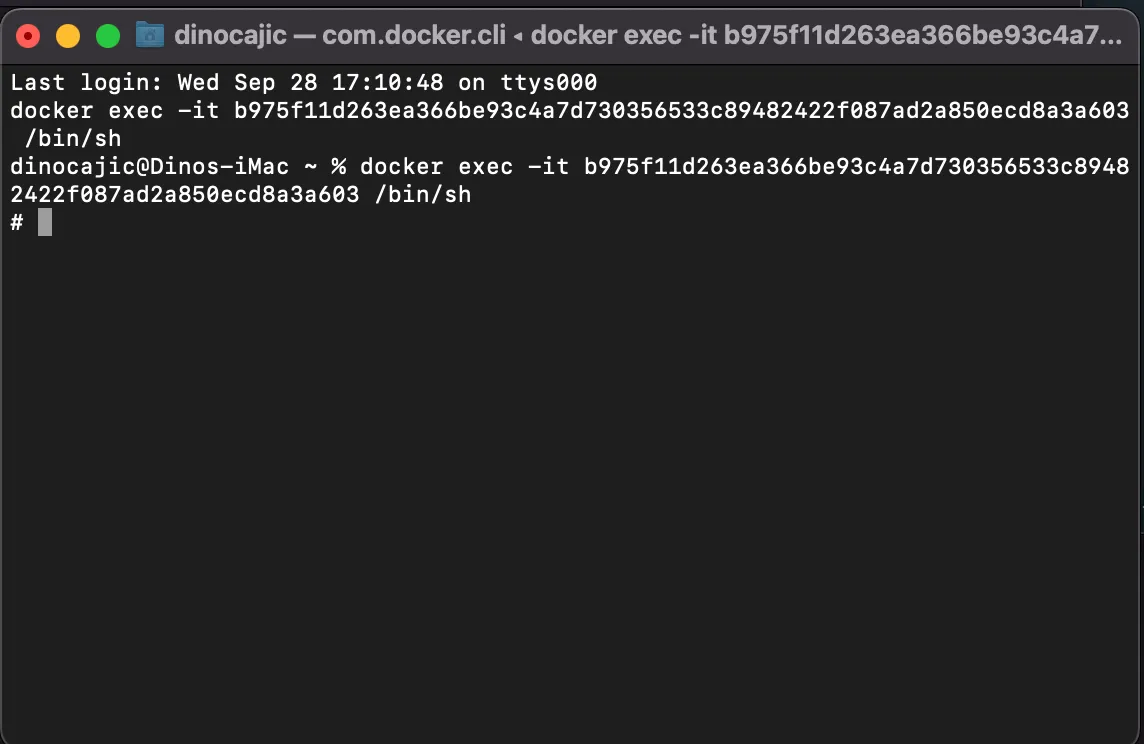
Once you’re in, you first need to run php artisan migrate to migrate the necessary files.
Next, it’s time to run the following line of code to get the laravel-excel package installed.
composer require maatwebsite/excel
PHP Fatal error:  Declaration of Maatwebsite\Excel\Cache\MemoryCache::get($key, $default = null) must be compatible with Psr\SimpleCache\CacheInterface::get(string $key, mixed $default = null): mixed in /var/www/html/vendor/maatwebsite/excel/src/Cache/MemoryCache.php on line 62
Symfony\Component\ErrorHandler\Error\FatalError
Declaration of Maatwebsite\Excel\Cache\MemoryCache::get($key, $default = null) must be compatible with Psr\SimpleCache\CacheInterface::get(string $key, mixed $default = null): mixed
at vendor/maatwebsite/excel/src/Cache/MemoryCache.php:62
58▕
59▕     /**
60▕      * {@inheritdoc}
61▕      */
➜  62▕     public function get($key, $default = null)
63▕     {
64▕         if ($this->has($key)) {
65▕             return $this->cache[$key];
66▕         }
If you do, open you composer.json file and add the modify the php version to:
"require": {
    "php": "^7.3 || ^8.0",
    "guzzlehttp/guzzle": "^7.2",
    "laravel/framework": "^9.19",
    "laravel/sanctum": "^3.0",
    "laravel/tinker": "^2.7",
    "maatwebsite/excel": "^3.1"
},
You’ll need to run composer update after you make the modification.
That’s it. It’s installed.
Creating Your First Importer
Run the following to create your first importer:
php artisan make:import UsersImport --model=User
UsersImport class in app/Imports/UsersImport.php.<?php
namespace App\Imports;
use App\Models\User;
use Maatwebsite\Excel\Concerns\ToModel;
class UsersImport implements ToModel
{
/**
* @param array $row
*
* @return \Illuminate\Database\Eloquent\Model|null
*/
public function model(array $row)
{
return new User([
//
]);
}
}
Mock Data
Before we start making modifications to this code, let’s look at our excel sheet that we’ll be importing. Place the MOCK_DATA.csv into your public folder.
User Model
We also need to know what are users table looks like that we’ll be importing this data into. Each row will be treated as an array of data. If we look at the first row as an array, we will get something like this:
$row = [
    'Patrick',
    'Spinnace',
    'pspinnace0@nsw.gov.au',
    'xGH4RNx',
];
Let’s look at our users migration and see what we get.
<?php

use Illuminate\Database\Migrations\Migration;
use Illuminate\Database\Schema\Blueprint;
use Illuminate\Support\Facades\Schema;

return new class extends Migration
{
    /**
     * Run the migrations.
     *
     * @return void
     */
    public function up()
    {
        Schema::create('users', function (Blueprint $table) {
            $table->id();
            $table->string('name');
            $table->string('email')->unique();
            $table->timestamp('email_verified_at')->nullable();
            $table->string('password');
            $table->rememberToken();
            $table->timestamps();
        });
    }

    /**
     * Reverse the migrations.
     *
     * @return void
     */
    public function down()
    {
        Schema::dropIfExists('users');
    }
};
Our User model defines the following fields as fillable.
protected $fillable = [
    'name',
    'email',
    'password',
];
UsersImport
We can now make the modifications to the UsersImport in order to import this data. We haven’t defined where the CSV file will be imported from yet; we’ll do that next.
<?php

namespace App\Imports;

use App\Models\User;
use Illuminate\Support\Facades\Hash;
use Maatwebsite\Excel\Concerns\ToModel;

class UsersImport implements ToModel
{
    /**
    * @param array $row
    *
    * @return \Illuminate\Database\Eloquent\Model|null
    */
    public function model(array $row)
    {
        return new User([
            'name'     => $row[0] . " " . $row[1],
            'email'    => $row[2],
            'password' => Hash::make($row[3]),
        ]);
    }
}
What does the following code say?
- We’re going to be accepting a row of data.
- Looking at our $row array, we know that
$row[0] = first_name,$row[1] = last_name,$row[2] = email, and$row[3] = password. - We create a
new Userand pass it thename,email, andpasswordfields. This inserts the data into theuserstable.
Great. We have the backbone. But where is this $row coming from? We need to create a route to trigger this import and a Controller that will grab the CSV file.
UserController
The UserController doesn’t exist yet, so let’s create it.
php artisan make:controller UserController
<?php

namespace App\Http\Controllers;

use Illuminate\Http\Request;

class UserController extends Controller
{
    //
}
Next, we’ll create our import function.
<?php

namespace App\Http\Controllers;

use Illuminate\Http\Request;
use App\Imports\UsersImport;
use Maatwebsite\Excel\Facades\Excel;

class UserController extends Controller
{
    public function import()
    {
        Excel::import(
            new UsersImport, 'MOCK_DATA.csv'
        );

       return redirect('/')->with('success', 'Users Import Successfully!');
    }
}
When the import method gets called, the Excel class calls its import method and we pass it two arguments:
- The Importer Class that we want to use,
- and the location of the file that we’re using.
Our MOCK_DATA.csv is located in public/MOCK_DATA.csv .
The Excel::import method will pass each row to our UsersImport class so that it can be processed. Once the entire thing is complete, we can redirect the user to a success message.
All that’s left is to create a route so that we can call our UserController::import method.
Defining the Route
Route::get('/import-users', [UserController::class, 'import']);
And that’s it. Navigate to your browser, specifically the localhost/import-users route, and watch the import occur.
Check Imported Data
Check Imported Data by going into your mysql container and executing the following commands.
sh-4.4# mysql -u sail -p password
sh-4.4# USE laravel;
sh-4.4# SELECT * FROM users;
sh-4.4# mysql -u sail -p
Enter password:
Welcome to the MySQL monitor.  Commands end with ; or \g.
Your MySQL connection id is 1851
Server version: 8.0.30 MySQL Community Server - GPL

Copyright (c) 2000, 2022, Oracle and/or its affiliates.

Oracle is a registered trademark of Oracle Corporation and/or its
affiliates. Other names may be trademarks of their respective
owners.

Type 'help;' or '\h' for help. Type '\c' to clear the current input statement.

mysql> show databases;
+--------------------+
| Database           |
+--------------------+
| information_schema |
| import_test        |
| performance_schema |
| testing            |
+--------------------+
4 rows in set (0.00 sec)

mysql> USE import_test;
Reading table information for completion of table and column names
You can turn off this feature to get a quicker startup with -A

Database changed
mysql> show tables;
+-----------------------------+
| Tables_in_import_test |
+-----------------------------+
| failed_jobs                 |
| migrations                  |
| password_resets             |
| personal_access_tokens      |
| users                       |
+-----------------------------+
5 rows in set (0.00 sec)

mysql> select * from users;
+-----+------------------------+------------------------------------+-------------------+--------------------------------------------------------------+----------------+---------------------+---------------------+
| id  | name                   | email                              | email_verified_at | password                                                     | remember_token | created_at          | updated_at          |
+-----+------------------------+------------------------------------+-------------------+--------------------------------------------------------------+----------------+---------------------+---------------------+
|   1 | first_name last_name   | email                              | NULL              | $2y$10$NMRPGMAa.4t6cjYsreNIK.yIJwS1q/g8ZsMVMNCiFkZZ3yZa03106 | NULL           | 2022-10-01 11:31:42 | 2022-10-01 11:31:42 |
|   2 | Patrick Spinnace       | pspinnace0@nsw.gov.au              | NULL              | $2y$10$QKBsSxFeeZsfz3N/NClZue7FCvToOtXI28i/MdVlussSCfjalB.Se | NULL           | 2022-10-01 11:31:42 | 2022-10-01 11:31:42 |
|   3 | Verla Petersen         | vpetersen1@edublogs.org            | NULL              | $2y$10$EZwecNqSbx8zdiHIoeg1lu/6OsfDYLXKAVdPf9P3G5pRYi72ik9I6 | NULL           | 2022-10-01 11:31:42 | 2022-10-01 11:31:42 |
|   4 | Alicea Hobbema         | ahobbema2@unicef.org               | NULL              | $2y$10$Al1UVhBXuqQcNXlxH96C6ONTzRopiiB6LqdgCghramIZM5b7Mr9zG | NULL           | 2022-10-01 11:31:42 | 2022-10-01 11:31:42 |
|   5 | Roma Mapstone          | rmapstone3@sfgate.com              | NULL              | $2y$10$Y959LZzbQqGS/mzL3qojjuuBK8gHhXOl3fKoqVcRG1ZbbmbYd3iqi | NULL           | 2022-10-01 11:31:42 | 2022-10-01 11:31:42 |
|   6 | Karol Stucke           | kstucke4@vk.com                    | NULL              | $2y$10$8/cdufCmjsYGd7W438LCxOlx6RJBYLWlE7KZevSvf9zFX8wGtz0KC | NULL           | 2022-10-01 11:31:42 | 2022-10-01 11:31:42 |
|   7 | Alick Isles            | aisles5@paypal.com                 | NULL              | $2y$10$w9ovjPb3qf/k1rX2gOrBJu7WLMkuEc.47b864t9O3ozkltY9ARuta | NULL           | 2022-10-01 11:31:42 | 2022-10-01 11:31:42 |
|   8 | Brandtr Kenwell        | bkenwell6@xinhuanet.com            | NULL              | $2y$10$Pfq9rdNqvVehVFoavUiBrOITTJK5NV.rlzpMsGxMwpdKWw1vh5v6y | NULL           | 2022-10-01 11:31:42 | 2022-10-01 11:31:42 |
|   9 | Sabine Ewer            | sewer7@sakura.ne.jp                | NULL              | $2y$10$8d9VeXD9Jv5lsxsgTORQ9uS9nUZ21jhmKJOaAqVtw432hLGnSPbOu | NULL           | 2022-10-01 11:31:42 | 2022-10-01 11:31:42 |
|  10 | Maude Harmeston        | mharmeston8@ezinearticles.com      | NULL              | $2y$10$o8zpDHZZmryn38NqTqzHzOUyAGiANRnf24g0fDtZZYGzqQXm8oo0q | NULL           | 2022-10-01 11:31:42 | 2022-10-01 11:31:42 |
|  11 | Hillel Gogin           | hgogin9@bravesites.com             | NULL              | $2y$10$FXKSXhVB4lBpYDbHqGX1A.a4CbQVsB4jC13bqXzjLVsATt1sDi8Z. | NULL           | 2022-10-01 11:31:42 | 2022-10-01 11:31:42 |
|  12 | Mohandis Drydale       | mdrydalea@patch.com                | NULL              | $2y$10$/VYPVzYdIU1bUnBCs5JbkOR5m2XpmW3DoWFlShJotJIt5.87Bdkl. | NULL           | 2022-10-01 11:31:42 | 2022-10-01 11:31:42 |
|  13 | Lil Caff               | lcaffb@squarespace.com             | NULL              | $2y$10$3n.kQnce1q1Bf3YHNwYycOnIUloGPbSHfB1jn0h9xwPxyGvOEqx5y | NULL           | 2022-10-01 11:31:42 | 2022-10-01 11:31:42 |
|  14 | Robinette Chamberlayne | rchamberlaynec@amazon.de           | NULL              | $2y$10$UHc1.mQTcne.kTVRGX8Vk.XYGHzdens.4YbtSsRXZzwZ78EOdnVZ2 | NULL           | 2022-10-01 11:31:42 | 2022-10-01 11:31:42 |
|  15 | Stinky Very            | sveryd@google.ru                   | NULL              | $2y$10$surCQoue6WktO4NEop3rzOm67YHY9Ewhqx4jE2tKdFmYu4kmcBvra | NULL           | 2022-10-01 11:31:42 | 2022-10-01 11:31:42 |
|  16 | Tressa Dubique         | tdubiquee@istockphoto.com          | NULL              | $2y$10$KvlqMSWGeFUphxwj5QkBf.yP2Zsoaee9PVQ9AvLqGFWadI4IBthRG | NULL           | 2022-10-01 11:31:43 | 2022-10-01 11:31:43 |
|  17 | Bernie Dubarry         | bdubarryf@gravatar.com             | NULL              | $2y$10$INyDD0jGmfR2lStqeOUOD.05nCpuRZ2az6G1m5PZ3osbgKCWX0.f2 | NULL           | 2022-10-01 11:31:43 | 2022-10-01 11:31:43 |
|  18 | Orville Dauber         | odauberg@squarespace.com           | NULL              | $2y$10$nfNHyDdcMpR/4yIOuIaOk.ftLXqZ/UQrwARlJfYl.ASd6yIeVxDEu | NULL           | 2022-10-01 11:31:43 | 2022-10-01 11:31:43 |
|  19 | Oran Freckelton        | ofreckeltonh@furl.net              | NULL              | $2y$10$wkPtf2KOCAulmyg7rpMvhuksCe6nLa0KBOG2WDp/cUxu7XpuQTbt6 | NULL           | 2022-10-01 11:31:43 | 2022-10-01 11:31:43 |
|  20 | Kelsy Hilliam          | khilliami@icio.us                  | NULL              | $2y$10$CGM0c4vbW1jdj5EkPb53NeT1tyAx6YbUMsHuWfKbYTpHkwr7/fUYa | NULL           | 2022-10-01 11:31:43 | 2022-10-01 11:31:43 |
+-----+------------------------+------------------------------------+-------------------+--------------------------------------------------------------+----------------+---------------------+---------------------+
101 rows in set (0.00 sec)

mysql>
One thing that you might have noticed is that the first row in our import is our header. We’ll need to remove it, but how? It’s pretty simple with Laravel-Excel.
Removing the first row from the import
We need to use the WithHeadingRow concern and change our integer index value to key based values.
<?php

namespace App\Imports;

use App\Models\User;
use Illuminate\Support\Facades\Hash;
use Maatwebsite\Excel\Concerns\ToModel;
use Maatwebsite\Excel\Concerns\WithHeadingRow;

class UsersImport implements ToModel, WithHeadingRow
{
    /**
    * @param array $row
    *
    * @return \Illuminate\Database\Eloquent\Model|null
    */
    public function model(array $row)
    {
        return new User([
            'name'     => $row['first_name'] . " " . $row['last_name'],
            'email'    => $row['email'],
            'password' => Hash::make($row['password']),
        ]);
    }
}
What this means is that WithHeadingRow created the following $row array:
$row = [
    first_name => 'Patrick',
    last_name  => 'Spinnace',
    email      => 'pspinnace0@nsw.gov.au',
    password   => 'xGH4RNx',
];
Truncate your table with truncate users and rerun the import by navigating back to the localhost/import-users. If you look at your users table now, you’ll see that the first row is gone.
Laravel Series
Continue your Laravel Learning.
Effortless Data Handling with Laravel Excel
Laravel Excel – P1: Setup And Basic Import
Learn how to set up Laravel Excel and master basic data imports with this step-by-step guide. Simplify your workflows and efficiently handle spreadsheets in your Laravel projects.

Master Multi-Sheet Imports with Laravel Excel
Laravel Excel – P2: Import Multiple Sheets Basics
Discover how to efficiently import multiple sheets using Laravel Excel. Manage complex data with ease and streamline your workflows.